Hey, everyone~~~!!! There is a good news to let you all know. With the development of the internet and broadband, everyone tend to say connected with friends without any restrictions. And, here I am going to tell you that this is not a dream that can't reach anymore. You can stay connected with all your friends without the hassles of logging in to several websites. Is it convenient??? You can just connected to facebook, MSN and twitter simultaneously and you just need 1 brower there. So, just let me proudly present you the

You may just wonder what is the iTalk WHOA!. So, what is it? ITalk Whoa is a Unified Messaging and Convergence platform providing single-point-access to Messaging & Collaboration systems. iTalk Whoa provides and interface that enables users to synchronize all the email accounts, social networking sites to enable them to connect, communicate and collaborate with their families and friends. You can email, SMS, make calls, connect with instant messaging and even read your favorite news through just one portal.
“iTalk WHOA! Lets you stay connected to your friends without the hassles of logging in to several websites. Need to send an email, check a friend’s status update or even make a long distance call? iTalk WHOA! Lets you do all that with just one click.”
Can you imagine that? You just need one click then you can ever send an email, check a friend’s status update or even make a long distance call. Unbelievable~~~!!! Right??? So would you like to know more about the iTalk WHOA features? Let's have a look~~~!!! :)
Webmail
• Standards-based webmail server
• Enable different webmails been view in one portal
• Integrates with major webmail services such as MSN, Yahoo! and Gmail
• Integrates with standards compliant corporate email servers
• Real-time true push of emails & attachments
• Works with IMAP, POP3, Exchange Servers and other standard protocols
• RSS allows to have a quick update on favorite news/ movies/ etc
Push eMail
• Enable email been push to mobile
• Real-time true push of emails & attachments
• Works with any mobile device without the need of a local client
• Has the potential to address the entire mobile phone user base in the corporate and consumer markets
Calendar & Task
• Provides powerful features that help users in organizing appointment, events, scheduling and tasks, amongst others
• Unique features with the added advantage of being a full web-based application
• Easy for users to manage their scheduling and appointments
• Capability to assign calendar information and create tasks to be shared with other users within their desktop or mobile workspace
Instant Messaging (IM)
• Full collaboration and communication solution
• Enable multiple Chat servers integrate into one IM Chat
• Provides an internal shared-space for collaboration with integrated tools such as IM Chat
• Capable of Desktop-Desktop, Desktop-Mobile collaboration
• No need for external service providers or, when required, capable of drawing in a large number of third-party providers into an aggregated platform for cross communication
Voice Call
• Enable users to communicate from PC with the lowest calling rate
Web SMS
• Enable users to send web sms from portal
• Users can send sms to any phone (local mobile/international mobile/fixed sms)
Synchronization
• Provides synchronization of data between desktop applications, mobile devices and vice-versa
• Synchronization includes emails, contacts, calendar, notes, to-do lists, messages
Integration Framework
• Mobility & Collaboration systems can now integrate seamlessly with other internal systems incl. Enterprise Applications or external web systems such as Social Networking streams
• Capable of drawing in desktop enterprise applications both legacy or new - essentially a future-proof, one-stop platform for any organization’s software solutions
• Plugged into the platform simply but securely
• Shared workspace for exchange of information and ideas independent of geographical location
• Provides virtual or physical access to a number of data assets (e.g.catalogs, websites, registries, document storage, and databases)
Social Networking Streams
• Seamless ITalk Whoa! integration with the most popular business & social networking services
• Single point access to all networks
• Easily managed within ITalk Whoa! interface
Security
• Digital Certificates for establishing Network connection using Secure Sockets
• Layer (SSL) Protocol with end-point security management
• Stored data accessible by all users within or across security domains
• Full anti-virus, anti-spam controls
• Supports:
• AES encryption
• Application Certificates
• Active Directory & Group Policy with role-based administration
• Secure / Multipurpose Internet Mail Extensions (S/MIME) encryption
To get the real experience of the iTalk Whoa!, you can just login to
http://www.italkwhoa.com/ to register as a member and play around with the functions available in there, as to familiarize with the program.
Just easy as 1, 2, 3~~~!!! Login/Register from iTalk Whoa! web-site~~~!!!
How to register iTalk Whoa! ???
- Simply click on the Menu Get WHOA! Now.
- The pop up dialog box will appear
- For those who want to get free RM5 airtime (limit to 8000 early bird only), user need to input their email and mobile number.
- Then the system will email their password and user can change the password upon 1st log in.
So don't miss the chance~~~!!! :)
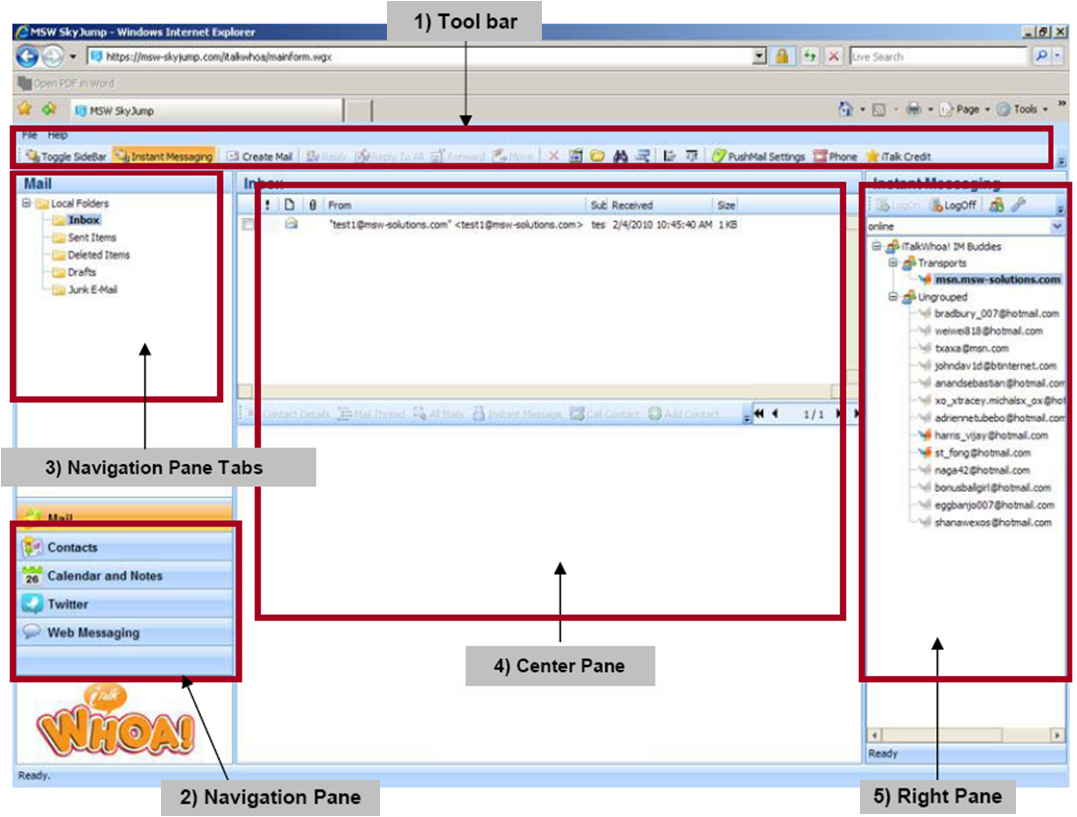
Interface of iTalk Whoa!
iTalk Whoa contain 5 sections, which consist of Tool bar, Navigation Pane Tabs, Navigation Pane, Center Pane and Right Pane. You have to try it and you totally can get used to it because it is very user-friendly.
There are few statements you have to know about iTalk Whoa!.
- It is possible to use iTalk Whoa! evern you are in oversea. The iTalk Whoa! is a portal service, regardless where ever you are from; the rates are applicable as it will be in the list.
iTalk Whoa! is an online portal that enables ppl to check their email, tweet, sms, call all from one website.- They just have to register as an iTalk Whoa! member first and they can do all that. While for 1st time user, you have to key in your password for you ie: twitter, email (yahoo, gmail, hotmail) etc for all at just one time. It will configure with your iTalkWhoa login password. You just have to key in 1 iTalkWhoa password next time, all others function will be automatically login.
- What you need to do is just to sign up the iTalk Whoa! @ http://italkwhoa.com/
- TM will provide this service really soon, hopefully somewhere in June 2010 for all users worldwide to purchase. But for now, you can purchase iTalk credit at Maybank2U, CIMB Clicks and all stores displaying iTalk. Only Malaysians are able to purchase for NOW.
- In future, iTalk are sold at shops displaying iTalk sign but only Malaysian.
For more information about iTalk Whoa!, please visit to
http://www.italkwhoa.com/. :)